Import Groups
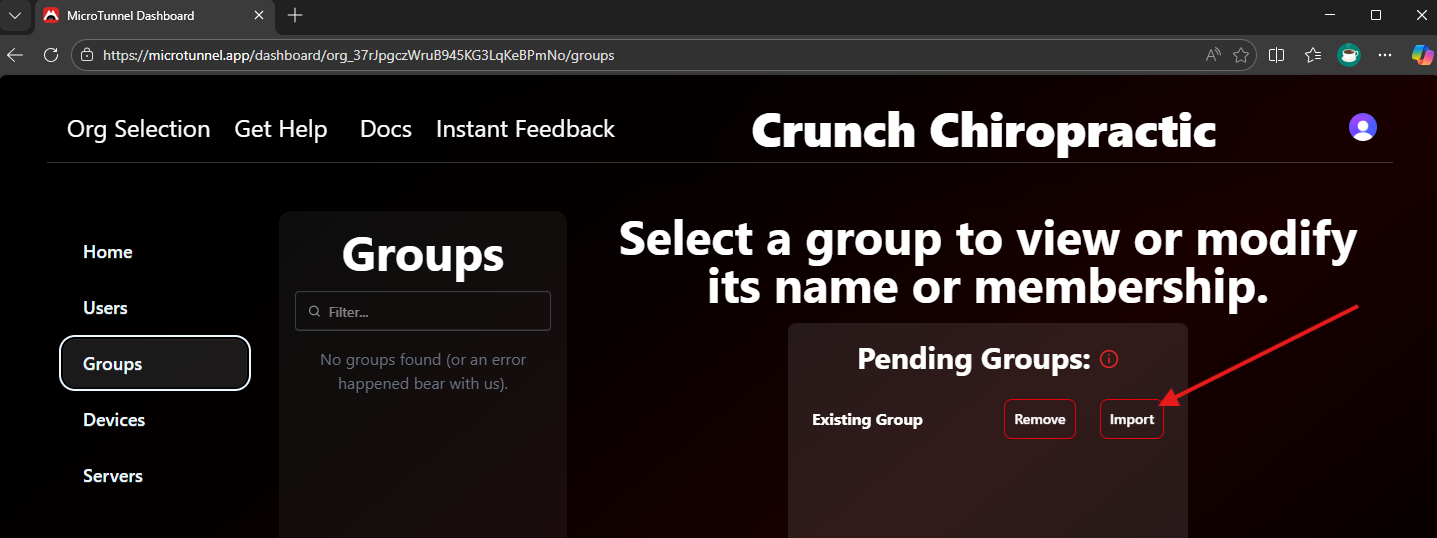
When a server has been asked to import its groups, this dialog appears on the Groups page when no group is selected. It lists all importable groups.
Click Import or Import All to bring selected groups into MicroTunnel and manage their membership.
Considerations
- If you choose not to import a group, click Remove. Otherwise, it remains available on this page for later import.
- Clicking View on an existing group hides this list and shows the selected group's details.
- After importing a group, the local group becomes MicroTunnel‑managed. See the notes here.
- When a group from one server is imported into MicroTunnel, it becomes fully managed and propagated to all other servers.
Propagation behavior
Propatation will create any groups not already on other servers or incorporate them into MicroTunnel management if they exist with the exact name.
Get Started | Pricing | Book a Call | Feedback | MicroTunnel Public Roadmap